
Kinside has launched messaging, making it easier than ever to connect with families.
Initiating and Sending Messages to Parents
As a provider, you have the ability to contact parents that have engaged with your program as a lead, requested a tour, joined the waitlist, applied for a spot, or messaged you. You can initiate and send a message to a parent three different ways:
-
Families page: Click to your Families page in the left side menu, then click the ••• overflow menu next to the family you'd like to message. Select Send family a message, then compose and send your message.
-
Waitlist page: Click Waitlist in your left side menu. Expand the waitlist card for the family you'd like to message, then click Message. You can search for the family in the search box at the top of the page, if needed. Compose and send your message.
-
Tours page: Click Tours in your left side menu, then click the ••• overflow menu next to the family you'd like to message. Select Send a message, then compose and send your message.
Receiving and Answering Messages Sent by Parents
When you receive a message, you'll be sent an email notification that will look a little bit like this: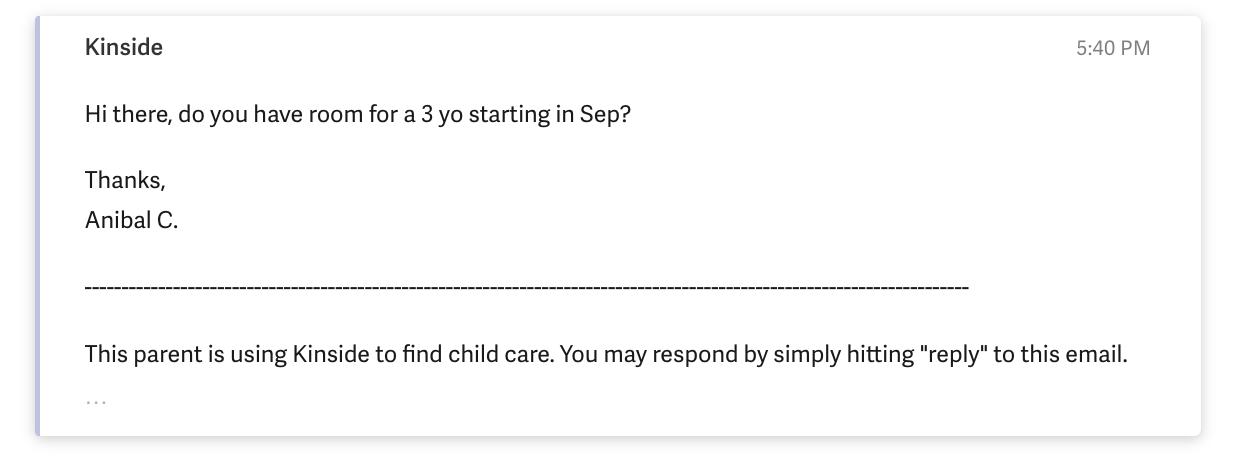
When it comes to responding to these messages, you have two options!
- Just reply to the email notification you received! It's that easy. No need to log in. The parent will receive your response and it will be logged in the Messages section of your Kinside app.
- Log in to respond. Navigate to Messages (in the left-side menu) to view and respond to all messages from parents in one place. Whenever you have new messages, you'll see a count of unread messages next to the "Messages" tab. Once you answer all messages, the counter goes away.
You can also click into a parent profile from a message with a parent. This will open in a new tab.
If you have more than one location, you'll need to select the location that has a message. Once you've selected the program with the message, you can click on any/each message to view:
That's it, you've started a conversation. From here you can work directly with parents to schedule tours, answer inquiries, and close enrollments.
Have any questions or need some help? Reach out to us via chat, or email us at support@kinside.com.